Free expiry tracker for Google Sheets
One sheet for everything that expires: business licences, insurance, certifications, contracts, vehicle registrations, subscriptions. It counts down the days, turns rows amber and red, and can email you (or each person) before the date.
Get the free Expiry TrackerAdd email reminders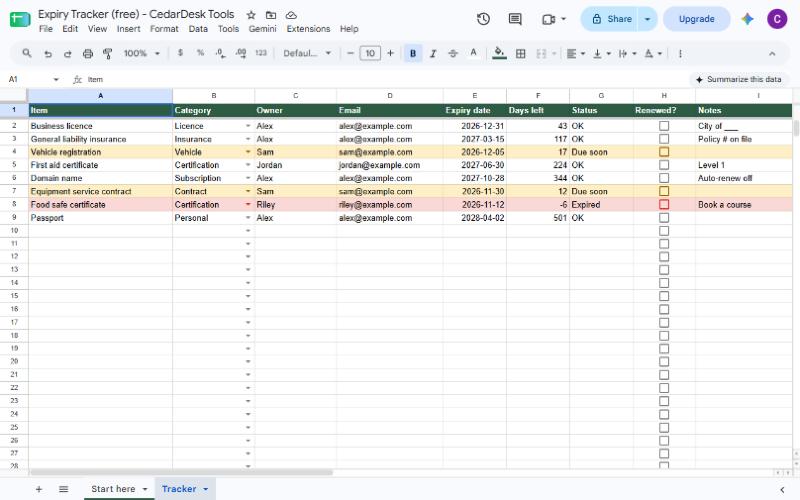
Watch: set it up in 2 minutes

What's in the template
| Column | What it does |
|---|---|
| Item, Category, Owner, Email | What expires, what kind of thing it is, and who looks after it. |
| Expiry date | The date it runs out. |
| Days left | Counts down automatically. Negative once it has expired. |
| Status | OK, Due soon (30 days or less, amber), Expired (red) or Renewed (grey). |
| Renewed? | Tick it when the renewal is done, or just enter the new expiry date. |
The formulas (if you'd rather build your own)
With the expiry date in column E and a Renewed? checkbox in column H, put these in the header row so they fill every row automatically:
={"Days left"; ARRAYFORMULA(IF(E2:E="", "", E2:E - TODAY()))}
={"Status"; ARRAYFORMULA(IF(E2:E="", "",
   IF(H2:H=TRUE, "Renewed",
   IF(E2:E < TODAY(), "Expired",
   IF(E2:E - TODAY() <= 30, "Due soon", "OK")))))}
Then Format → Conditional formatting on the whole table with a custom formula such as =$G2="Expired" (red) and =$G2="Due soon" (amber). More on countdowns: Due date countdown in Google Sheets.
Get an email before anything expires
Colours only help when you open the sheet. The free Email Reminders - Due Date Alerts add-on checks the sheet every day and emails you, or the owner in each row, before each date. Even with the sheet closed.
- Install Email Reminders (free), then Extensions → Email Reminders → Open reminders.
- Click + Add and start from Certification / licence expiry. It picks your Expiry date, Email and Renewed? columns for you.
- Tick when to send. The preset sends 90, 60, 30 and 7 days before, on the day, and 7 days after. Change it to whatever you like.
- Click Save, then Turn on the daily schedule.
It stops reminding as soon as Renewed? is ticked, never sends the same reminder twice, and logs every email on a CedarDesk Log tab. Prefer one email instead of many? Choose Digest and get a single list of everything due in the next 30 days.
Install Email Reminders (free)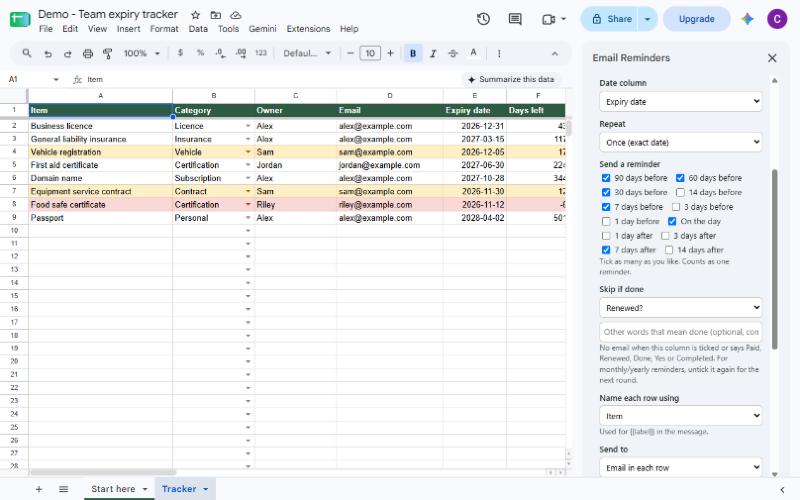
Ideas for what to track
- Small business: business licence, liability insurance, permits, domain and hosting, software subscriptions.
- Staff: first aid, food safe, WHMIS, forklift and other certifications. See also the certificate of insurance tracker for vendors.
- Home and family: passports, driver's licences, vehicle insurance and registration, warranties.
- Landlords: lease end dates, rental insurance, smoke alarm checks. Rent itself? Use the rent tracker.
FAQ
Is the expiry tracker free?
Yes. Make a copy and keep it. The Email Reminders add-on is free too, for up to 5 reminders per spreadsheet.
Does it work in Excel?
It's built for Google Sheets. You can download it as an Excel file, but the formulas use ARRAYFORMULA and the email reminders only work in Google Sheets.
Can it remind a different person for each row?
Yes. Put each person's email in the Email column and choose Send to: Email in each row.
What happens after I renew something?
Tick Renewed? to stop the reminders, or type the new expiry date and untick it. Reminders start again for the new date.