Document expiry reminder in Google Sheets (passports, IDs, licences)
Passports, driver's licences, health cards and permits all expire on different dates, and renewing often takes weeks. This free Google Sheets template keeps every family member's documents in one list and can email you before each one runs out.
Get the free templateAdd email reminders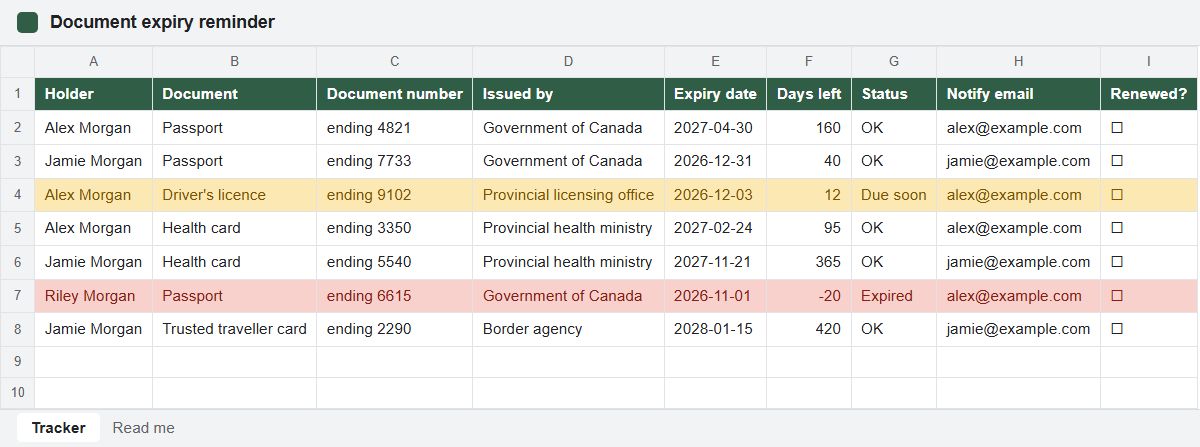
Watch: set it up in 2 minutes

What the document sheet records
Passports, driver's licences, health cards and permits are easy to forget until you need them. This sheet lists each person's documents on one page, so you can see at a glance which ones will expire before the next trip or deadline.
| Column | What it does |
|---|---|
| Holder | Whose document it is, so a family or small team can share one list. |
| Document | Dropdown: passport, driver's licence, health card, work permit, trusted traveller card, other. |
| Document number | Only the last four digits. Do not store the full number. |
| Issued by | The office you will renew with. |
| Expiry date | The printed expiry date. |
| Days left | Counts down automatically. Negative once the date has passed. |
| Status | OK, Due soon (amber, 30 days or less), Expired (red) or Renewed (grey). |
| Notify email | Who gets the reminder. For a child's passport, use a parent's address. |
| Renewed? | Tick it once the renewal is done. The row turns grey and reminders stop. |
A sample family's documents
| Holder | Document | Issued by | Expiry date | Days left | Status |
|---|---|---|---|---|---|
| Alex Morgan | Passport | Government of Canada | 2027-04-30 | 160 | OK |
| Jamie Morgan | Passport | Government of Canada | 2026-12-31 | 40 | OK |
| Alex Morgan | Driver's licence | Provincial licensing office | 2026-12-03 | 12 | Due soon |
| Alex Morgan | Health card | Provincial health ministry | 2027-02-24 | 95 | OK |
| Jamie Morgan | Health card | Provincial health ministry | 2027-11-21 | 365 | OK |
| Riley Morgan | Passport | Government of Canada | 2026-11-01 | -20 | Expired |
| Jamie Morgan | Trusted traveller card | Border agency | 2028-01-15 | 420 | OK |
Riley's passport expired 20 days ago and is red, which is a problem if a trip is coming. Alex's licence is amber at 12 days. Jamie's passport is outside 30 days, so it shows OK, but see the lead-time note below.
Set the reminder by lead time, not just the expiry date
For documents, the real deadline is earlier than the date printed on the card. Two things push it back.
- Travel rules. Many countries want a passport to be valid for several months after you arrive. Check the rule for the places you visit, and treat your own deadline as that many months before expiry.
- Processing time. Passports, permits and photo cards can take weeks to renew. Look up the current time on the issuer's website and add a buffer.
A practical way to apply this: set the sheet's Expiry date to the printed date, then pick reminders that start 6 months and 3 months out for passports, and 60 and 30 days out for licences and cards.
Keep it private. Store only the last four digits of each document number. Never put full passport numbers or scans in a sheet shared widely.
Get a reminder in time to renew
The free Email Reminders - Due Date Alerts add-on checks your sheet every day and emails you before the date, even with the sheet closed.
- Install Email Reminders (free), then Extensions → Email Reminders → Open reminders.
- Click + Add and start from Renewal coming up. Pick the Expiry date column and the Notify email column, and the Renewed? column as the done checkbox.
- Tick when to send, for example 180, 90, 30 and 7 days before for passports, and a shorter schedule for cards and licences. Change it to whatever suits you.
- Click Save, then Turn on the daily schedule.
Each reminder goes to the address in that row, so one person can manage the whole household's list. The add-on runs every day on Google's servers, never sends the same reminder twice, stops when the done box is ticked, and logs every email on a CedarDesk Log tab. It is free for up to 5 reminders per spreadsheet.
Install Email Reminders (free)Documents families and teams list
- Travel: passports, visas, trusted traveller cards.
- Identity: driver's licences, health cards and photo ID.
- Work and study: work permits, study permits, professional cards.
- Other: boat and firearm licences, club memberships, parking permits.
- Tracking business paperwork? See the licence renewal reminder.
Document expiry questions
How much of a document number should I store?
Only the last four digits, which is enough to tell documents apart. Never store a full passport or ID number in a shared sheet.
How long before expiry should I renew a passport?
Allow for processing time and for travel rules in the countries you visit, which often require several months of validity. Starting six months out is a safe default.
Can one sheet cover the whole family?
Yes. Use one row per document, with the holder's name in the first column, and filter by holder when you need to.
Can a parent get reminders for a child's documents?
Yes. Put the parent's email in Notify email on that child's rows, and the reminder goes to them.