Employee certification tracker for Google Sheets (free, with expiry alerts)
Keep every staff ticket in one sheet: first aid, food safe, WHMIS, forklift, driver abstracts. It shows who is current, who is due soon and who has lapsed, and can email people before their certificate expires.
Get the free templateAdd email reminders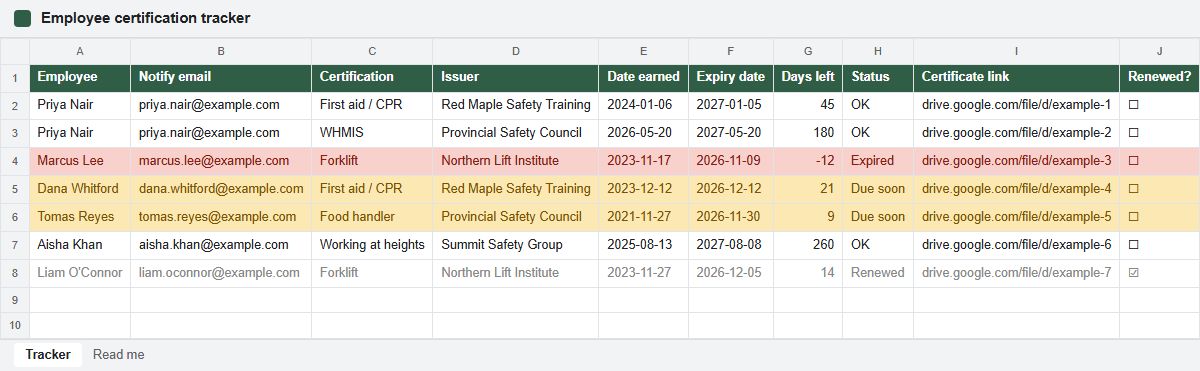
Watch: set it up in 2 minutes

Columns for staff tickets
Staff certifications fail in a predictable way: someone is on the schedule with a lapsed ticket and nobody noticed. This template keeps one row per person per ticket, so you can sort by who is due next or by which ticket type is most exposed.
| Column | What it does |
|---|---|
| Employee | One row per person per ticket, so someone with three tickets has three rows. |
| Notify email | The person's work email. Reminders go here. |
| Certification | Dropdown: first aid / CPR, WHMIS, forklift, food handler, working at heights, other. |
| Issuer | The training provider, useful when you book the renewal course. |
| Date earned | When the ticket was issued. |
| Expiry date | When it lapses. The one date everything else is based on. |
| Days left | Counts down automatically. Negative once the date has passed. |
| Status | OK, Due soon (amber, 30 days or less), Expired (red) or Renewed (grey). |
| Certificate link | Paste a Drive link to the scanned certificate or wallet card. |
| Renewed? | Tick it once the renewal is done. The row turns grey and reminders stop. |
Example: a small crew with seven tickets
| Employee | Certification | Issuer | Expiry date | Days left | Status |
|---|---|---|---|---|---|
| Priya Nair | First aid / CPR | Red Maple Safety Training | 2027-01-05 | 45 | OK |
| Priya Nair | WHMIS | Provincial Safety Council | 2027-05-20 | 180 | OK |
| Marcus Lee | Forklift | Northern Lift Institute | 2026-11-09 | -12 | Expired |
| Dana Whitford | First aid / CPR | Red Maple Safety Training | 2026-12-12 | 21 | Due soon |
| Tomas Reyes | Food handler | Provincial Safety Council | 2026-11-30 | 9 | Due soon |
| Aisha Khan | Working at heights | Summit Safety Group | 2027-08-08 | 260 | OK |
| Liam O'Connor | Forklift | Northern Lift Institute | 2026-12-05 | 14 | Renewed |
Marcus's forklift ticket is already red, so he should not be driving the lift until it is renewed. Dana and Tomas are amber and can still be booked onto a course. Liam's renewed forklift row is grey.
Run a monthly compliance check by person and by ticket
A 10-minute review on the first of each month catches most gaps. Courses fill up weeks ahead, so the useful number is not today's status but who will be due in the next 90 days.
- Create a filter and sort by Days left, smallest first. Anything negative is a lapsed ticket that needs action today.
- Filter Certification to one type at a time (for example forklift) to book a group course instead of paying for one-off seats.
- For each Due soon row, note the course date in your calendar and message the employee.
- After the course, add the new certificate link, enter the new expiry date and tick Renewed? on the old row.
Keep a separate row for each ticket rather than packing several into one cell. It is what makes the counts and filters work.
Email staff before their ticket lapses
The free Email Reminders - Due Date Alerts add-on checks your sheet every day and emails you before the date, even with the sheet closed.
- Install Email Reminders (free), then Extensions → Email Reminders → Open reminders.
- Click + Add and start from Renewal coming up. Pick the Expiry date column and the Notify email column, and the Renewed? column as the done checkbox.
- Tick when to send, for example 90, 60, 30 and 7 days before expiry, since renewal courses book up. Change it to whatever suits you.
- Click Save, then Turn on the daily schedule.
Each person is emailed at the address in their own row, so you do not have to chase anyone by hand. The add-on runs every day on Google's servers, never sends the same reminder twice, stops when the done box is ticked, and logs every email on a CedarDesk Log tab. It is free for up to 5 reminders per spreadsheet.
Install Email Reminders (free)Tickets and training worth listing
- Safety: first aid and CPR, WHMIS, working at heights, fall protection.
- Equipment: forklift, aerial lift, crane and heavy equipment tickets.
- Food service: food handler and allergen certificates.
- Driving: driver abstracts and commercial licence classes.
- Need one tracker for everything that expires? Try the expiry tracker.
Certification tracker questions
Which certifications can I track in this sheet?
Any with an expiry date. The dropdown lists first aid and CPR, WHMIS, forklift, food handler and working at heights, and you can add your own to the list.
How far ahead should staff be reminded?
A reminder 90 days out leaves time to book a course, with follow-ups at 60, 30 and 7 days. Short renewals can use a shorter schedule.
Does one person need one row or several?
Several. Use one row for each ticket a person holds. That way each certificate has its own expiry date, status and reminder.
Can I store a copy of each certificate?
Yes. Upload the scan to Drive and paste its link in the Certificate link column. Only share the sheet with people who need to see it.