Insurance policy renewal tracker (free Google Sheets template with reminders)
Home, auto, business and liability policies all renew on different dates, and an auto-renewal at a higher price is easy to miss. This free Google Sheets template lists every policy, counts down to the renewal date, and can email you ahead of time.
Get the free templateAdd email reminders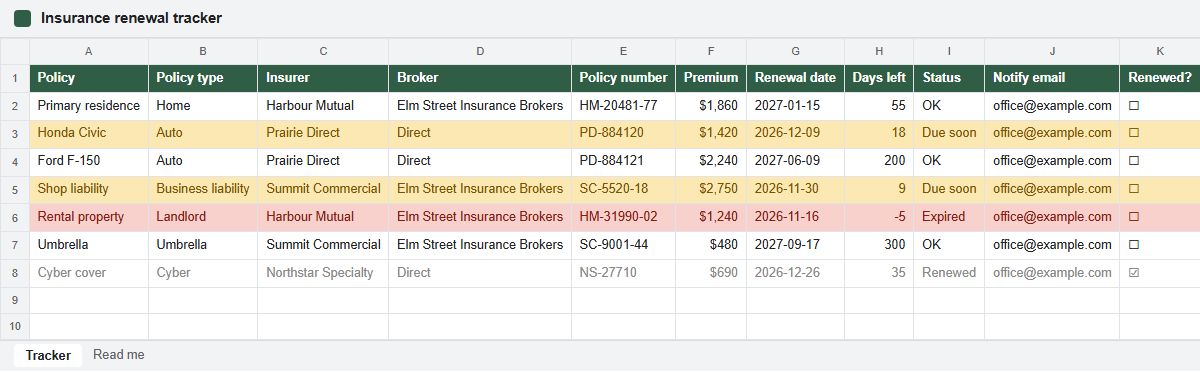
Watch: set it up in 2 minutes

Policy details the sheet keeps
An insurance policy that renews on its own is convenient, but it is also how premiums creep up unchecked. This sheet puts every policy, insurer, broker and premium on one page, with the renewal date counting down so you can compare quotes while there is still time to switch.
| Column | What it does |
|---|---|
| Policy | A short label: the property, vehicle or business it covers. |
| Policy type | Dropdown: home, auto, business liability, landlord, umbrella, cyber, life, other. |
| Insurer | The company that carries the risk. |
| Broker | Your broker or agent, or Direct if you buy straight from the insurer. |
| Policy number | The number you quote when you call. |
| Premium | What you pay per year. Update it each renewal so you can spot increases. |
| Renewal date | When the policy ends and renews. |
| Days left | Counts down automatically. Negative once the date has passed. |
| Status | OK, Due soon (amber, 30 days or less), Expired (red) or Renewed (grey). |
| Notify email | Where reminders go. |
| Renewed? | Tick it once the renewal is done. The row turns grey and reminders stop. |
Sample household and business policies
| Policy | Policy type | Insurer | Premium | Renewal date | Days left | Status |
|---|---|---|---|---|---|---|
| Primary residence | Home | Harbour Mutual | $1,860 | 2027-01-15 | 55 | OK |
| Honda Civic | Auto | Prairie Direct | $1,420 | 2026-12-09 | 18 | Due soon |
| Ford F-150 | Auto | Prairie Direct | $2,240 | 2027-06-09 | 200 | OK |
| Shop liability | Business liability | Summit Commercial | $2,750 | 2026-11-30 | 9 | Due soon |
| Rental property | Landlord | Harbour Mutual | $1,240 | 2026-11-16 | -5 | Expired |
| Umbrella | Umbrella | Summit Commercial | $480 | 2027-09-17 | 300 | OK |
| Cyber cover | Cyber | Northstar Specialty | $690 | 2026-12-26 | 35 | Renewed |
The rental property policy passed its date five days ago, so it is red and worth a call today. The shop liability and car policies are amber. The cyber policy is ticked Renewed and has gone grey.
A 60-day plan for shopping a renewal
Quotes take longer than people expect, and your current insurer's renewal offer often arrives only a few weeks before the date. Working backwards from the renewal date gives you room to compare.
- 60 days out: the first reminder lands. Open the policy, note what changed in your life (new driver, renovation, more staff, more revenue) and ask your broker for quotes.
- 45 days out: compare the renewal offer to last year's Premium and to at least two other quotes. Check limits and deductibles, not just price.
- 30 days out: decide whether to stay or switch. Switching often needs the new policy to start before the old one ends.
- 7 days out: confirm the payment method and that you have the new documents.
After renewing, overwrite Premium and Renewal date with the new values and tick Renewed?. Keeping a note of last year's premium makes the next comparison easy.
Hear about renewals while you can still switch
The free Email Reminders - Due Date Alerts add-on checks your sheet every day and emails you before the date, even with the sheet closed.
- Install Email Reminders (free), then Extensions → Email Reminders → Open reminders.
- Click + Add and start from Renewal coming up. Pick the Renewal date column, and the Renewed? column as the done checkbox.
- Tick when to send, for example 60, 45, 30 and 7 days before the renewal date. Change it to whatever suits you.
- Click Save, then Turn on the daily schedule.
The early reminders matter most here, because that is when quotes are easy to get. The add-on runs every day on Google's servers, never sends the same reminder twice, stops when the done box is ticked, and logs every email on a CedarDesk Log tab. It is free for up to 5 reminders per spreadsheet.
Install Email Reminders (free)Policies to put on the list
- Personal: home, tenant, auto, life and umbrella policies.
- Business: general liability, professional liability, property and cyber.
- Landlords: rental property and landlord liability.
- Vendor proof: tracking other people's cover? See the certificate of insurance tracker.
Insurance tracker questions
How early should I start shopping for a renewal?
About 60 days before. That gives you time to collect quotes and compare limits and deductibles, rather than accepting whatever the renewal notice says.
Does the sheet show how much my premium went up?
It shows the premium you enter. Update it each renewal and keep last year's figure in a note, or add a column for it, to compare.
Should I track the end date or the payment date?
Track the renewal date, which is when the policy ends and the new term starts. If you pay in instalments, add the payment dates in a note.
Can I track several properties or vehicles?
Yes. Use one row per policy and put the property or vehicle in the Policy column, then filter by Policy type or Insurer.