Contract renewal tracker for Google Sheets (free, with reminders)
Auto-renewing contracts are easy to forget until the invoice lands. This free Google Sheets template lists every contract, counts down to the renewal or end date, and can email you well before the cancellation deadline.
Get the free templateAdd email reminders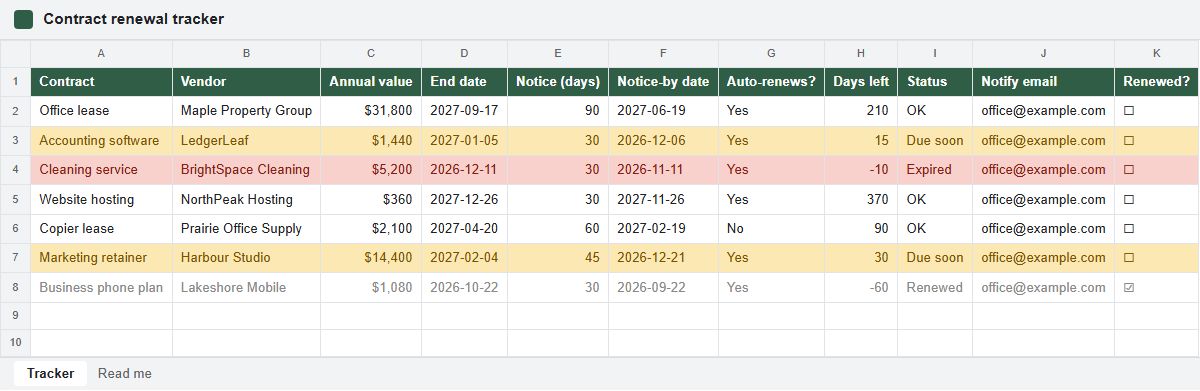
Watch: set it up in 2 minutes

Columns in the contract tracker
The date that matters on most contracts is not the end date. It is the last day you can give notice. This template stores both and counts down to the notice-by date, so the reminder arrives while you can still act.
| Column | What it does |
|---|---|
| Contract | What the agreement is for: lease, software, service, retainer. |
| Vendor | Who it is with. |
| Annual value | What it costs per year, so you can sort the big ones to the top. |
| End date | When the current term finishes or auto-renews. |
| Notice (days) | How many days' written notice the contract requires to cancel. |
| Notice-by date | Calculated: end date minus notice days. This is your real deadline. |
| Auto-renews? | Yes or No dropdown. Filter on Yes to see what will roll over if you do nothing. |
| Days left | Counts down automatically. Negative once the date has passed. |
| Status | OK, Due soon (amber, 30 days or less), Expired (red) or Renewed (grey). |
| Notify email | Where reminders go. Use a shared inbox if more than one person handles contracts. |
| Renewed? | Tick it once the renewal is done. The row turns grey and reminders stop. |
Sample contracts and how they score
| Contract | End date | Notice (days) | Notice-by date | Auto-renews? | Days left | Status |
|---|---|---|---|---|---|---|
| Office lease | 2027-09-17 | 90 | 2027-06-19 | Yes | 210 | OK |
| Accounting software | 2027-01-05 | 30 | 2026-12-06 | Yes | 15 | Due soon |
| Cleaning service | 2026-12-11 | 30 | 2026-11-11 | Yes | -10 | Expired |
| Website hosting | 2027-12-26 | 30 | 2027-11-26 | Yes | 370 | OK |
| Copier lease | 2027-04-20 | 60 | 2027-02-19 | No | 90 | OK |
| Marketing retainer | 2027-02-04 | 45 | 2026-12-21 | Yes | 30 | Due soon |
| Business phone plan | 2026-10-22 | 30 | 2026-09-22 | Yes | -60 | Renewed |
Look at the cleaning service: its notice-by date (2026-11-11) has already passed, so Days left shows -10 and the Status is Expired, even though the contract itself does not end until 2026-12-11. That is the situation the sheet is built to catch early. The phone plan is ticked Renewed, so it turns grey and stops nagging.
Work out the real deadline: notice-period math
Take a contract that ends on March 31 with 60 days' notice. The notice-by date is January 30, not March 31. Miss January 30 and many contracts roll into a new term, sometimes a full year.
- Enter the end date and the notice length in days. The sheet subtracts them for you.
- Check the contract wording. Some count business days, and some need notice to be received, not just sent. Allow extra days for mail or a courier.
- Add a few days of buffer by raising the notice number by 5 to 10. Cancelling a day late costs far more than a day early.
- Sort by Notice-by date, then compare the Annual value of anything that is Due soon. That tells you what is worth renegotiating.
Tick Renewed? once you have renewed or cancelled, so the row stops showing as urgent. Then add the new end date as a fresh row.
Get emailed before the notice deadline
The free Email Reminders - Due Date Alerts add-on checks your sheet every day and emails you before the date, even with the sheet closed.
- Install Email Reminders (free), then Extensions → Email Reminders → Open reminders.
- Click + Add and start from Renewal coming up. Pick the Notice-by date column, and the Renewed? column as the done checkbox.
- Tick when to send, for example 60, 30, 14 and 7 days before the notice-by date. Change it to whatever suits you.
- Click Save, then Turn on the daily schedule.
Because it watches the notice-by date, you hear about a contract while cancelling is still possible. The add-on runs every day on Google's servers, never sends the same reminder twice, stops when the done box is ticked, and logs every email on a CedarDesk Log tab. It is free for up to 5 reminders per spreadsheet.
Install Email Reminders (free)What belongs in a contract tracker
- Leases: office, storage, equipment and vehicle leases with long notice periods.
- Software and hosting: annual plans that renew at the full list price.
- Service contracts: cleaning, security, maintenance, retainers and agencies.
- Memberships and supply deals: anything with a minimum term.
- Tracking one-off expiries instead? Use the expiry tracker.
Contract tracker questions
What is a notice-by date and how is it calculated?
It is the last day you can give notice and still avoid the next term. The sheet calculates it as the end date minus the notice period in days. Always confirm the exact wording in your contract.
Should the reminder watch the end date or the notice-by date?
The notice-by date. The end date is usually too late to cancel, so the template counts down to the notice-by date and colours the row from that.
What does the Auto-renews column do?
It is a Yes or No dropdown you can filter on. It does not change the maths, but it shows which contracts will roll over if you do nothing.
Can I track what each contract costs?
Yes. Enter the yearly amount in Annual value, then sort or filter to see your biggest commitments. A SUM at the bottom gives the total.