Subscription renewal tracker for Google Sheets
Streaming, software, memberships and annual plans quietly renew at full price. This free Google Sheets template lists every subscription, counts down to the next renewal, and can email you before you are charged.
Get the free templateAdd email reminders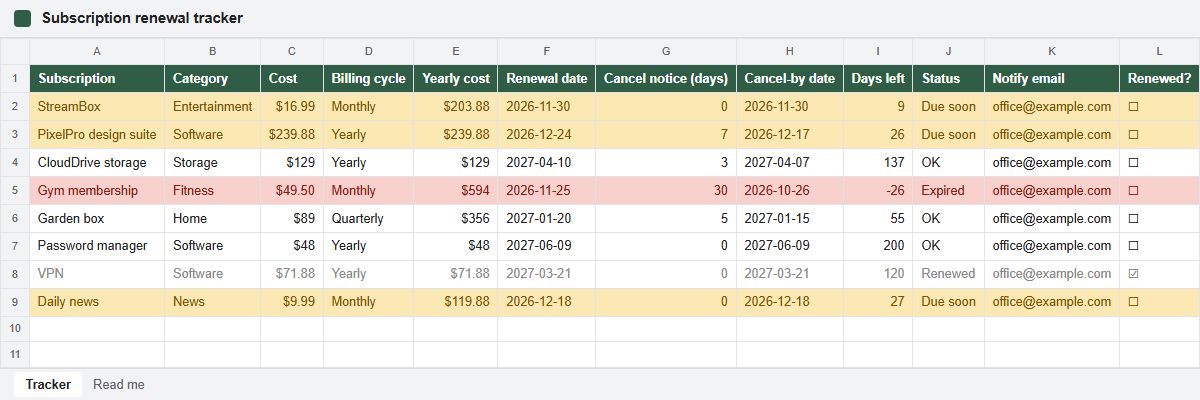
Watch: set it up in 2 minutes

How the subscription columns work
Subscriptions rarely cost much alone, and that is why they add up. This tracker converts every plan to a yearly cost, works out the last day you can cancel, and counts down to it, so the question is always "is this still worth it?" before the charge, not after.
| Column | What it does |
|---|---|
| Subscription | The service or membership. |
| Category | Dropdown: entertainment, software, storage, fitness, news, home, other. |
| Cost | What each charge is. |
| Billing cycle | Monthly, quarterly or yearly. |
| Yearly cost | Calculated: what the subscription costs over twelve months. Shown on the Read me tab as a total. |
| Renewal date | The next date you will be charged. |
| Cancel notice (days) | How many days before renewal you must cancel. Zero if you can cancel any time. |
| Cancel-by date | Calculated: renewal date minus notice days. The status counts down to this date. |
| Days left | Counts down automatically. Negative once the date has passed. |
| Status | OK, Due soon (amber, 30 days or less), Expired (red) or Renewed (grey). |
| Notify email | Where reminders go. |
| Renewed? | Tick it once the renewal is done. The row turns grey and reminders stop. |
Eight sample subscriptions
| Subscription | Cost | Billing cycle | Yearly cost | Renewal date | Cancel-by date | Days left | Status |
|---|---|---|---|---|---|---|---|
| StreamBox | $16.99 | Monthly | $203.88 | 2026-11-30 | 2026-11-30 | 9 | Due soon |
| PixelPro design suite | $239.88 | Yearly | $239.88 | 2026-12-24 | 2026-12-17 | 26 | Due soon |
| CloudDrive storage | $129 | Yearly | $129 | 2027-04-10 | 2027-04-07 | 137 | OK |
| Gym membership | $49.50 | Monthly | $594 | 2026-11-25 | 2026-10-26 | -26 | Expired |
| Garden box | $89 | Quarterly | $356 | 2027-01-20 | 2027-01-15 | 55 | OK |
| Password manager | $48 | Yearly | $48 | 2027-06-09 | 2027-06-09 | 200 | OK |
| VPN | $71.88 | Yearly | $71.88 | 2027-03-21 | 2027-03-21 | 120 | Renewed |
| Daily news | $9.99 | Monthly | $119.88 | 2026-12-18 | 2026-12-18 | 27 | Due soon |
The gym membership needs 30 days' notice and the renewal is four days away, so the cancel-by date has already passed and it shows Expired: cancelling now only stops the cycle after next. The design suite and the news plan are amber, and the VPN is ticked Renewed.
Audit your subscriptions before they renew
Most people only look at their subscriptions when a statement shocks them. A quick audit using this sheet takes about half an hour once, and then reminders do the rest.
- List everything from the last three bank or card statements. Enter the cost, billing cycle and renewal date.
- Sort by Yearly cost, largest first. The Read me tab shows the total, which is often higher than people expect.
- For the top few, ask whether you used it in the last month. If not, cancel or switch to a cheaper tier.
- Add a Cancel notice for any plan that requires advance notice, so the sheet counts down to the real deadline.
- For free trials, enter a cost of 0 and the day the trial ends, so you remember before it converts.
The sheet does not connect to your bank, so there is nothing to link or authorize. Prices change, so update the cost on the renewal row when a plan goes up.
Get a reminder before you are charged
The free Email Reminders - Due Date Alerts add-on checks your sheet every day and emails you before the date, even with the sheet closed.
- Install Email Reminders (free), then Extensions → Email Reminders → Open reminders.
- Click + Add and start from Renewal coming up. Pick the Cancel-by date column, and the Renewed? column as the done checkbox.
- Tick when to send, for example 14, 7 and 3 days before the cancel-by date, or one reminder a week ahead for monthly plans. Change it to whatever suits you.
- Click Save, then Turn on the daily schedule.
Free covers up to 5 reminders per spreadsheet, so use one for the whole list rather than one per plan. The add-on runs every day on Google's servers, never sends the same reminder twice, stops when the done box is ticked, and logs every email on a CedarDesk Log tab. It is free for up to 5 reminders per spreadsheet.
Install Email Reminders (free)Subscriptions people forget
- Streaming and media: video, music, news and magazines.
- Software: design, productivity, VPN and password managers.
- Storage and backup: cloud storage and photo backups.
- Memberships: gym, clubs, warehouse stores and meal kits.
- Business plans with longer terms? See the contract renewal tracker.
Subscription tracker questions
Which date does the reminder watch?
The cancel-by date, which is the renewal date minus your cancel notice. If a plan needs no notice, the two dates are the same.
How is the yearly cost worked out?
From the cost and billing cycle. Monthly is multiplied by 12, quarterly by 4, and yearly is used as entered. The Read me tab totals the column.
Can I track free trials?
Yes. Enter a cost of 0, set the renewal date to the day the trial converts, and the sheet counts down to it like any other plan.
Does it connect to my bank or card?
No. You enter the details yourself, so no financial account is linked and nothing is shared.