Vehicle registration and inspection reminder in Google Sheets (free template)
Plate renewals, safety inspections, emissions tests and insurance all come due on different dates. This free Google Sheets template lists every vehicle's dates, counts down the days, and can email you before each one is due.
Get the free templateAdd email reminders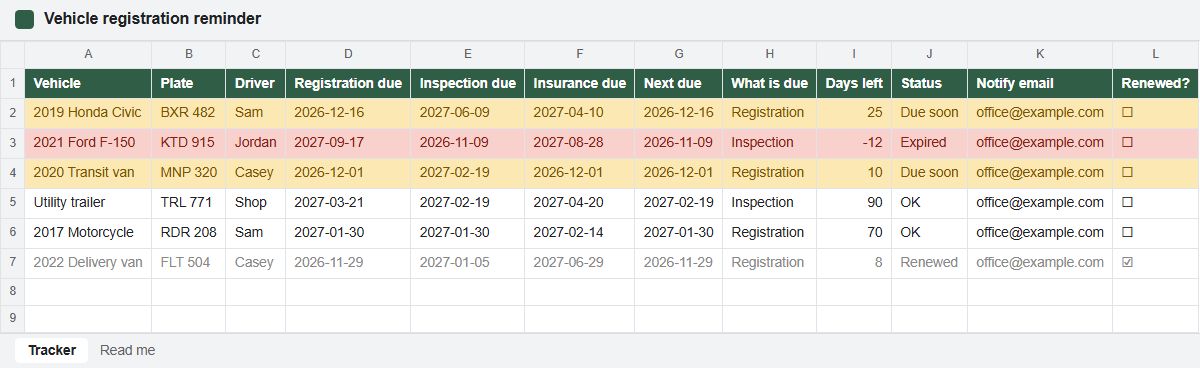
Watch: set it up in 2 minutes

One row per vehicle, three dates
A vehicle has several due dates that never line up: plates, a safety or emissions check, and insurance. This template keeps all three on one row per vehicle, works out which comes first and says what it is, so you can see the next job at a glance.
| Column | What it does |
|---|---|
| Vehicle | Year, make and model, or a fleet name. |
| Plate | Licence plate, to tell similar vehicles apart. |
| Driver | Who uses it, so you know who to chase. |
| Registration due | When the plate or registration renews. |
| Inspection due | Safety check or emissions test date, where your area requires one. |
| Insurance due | When the vehicle's insurance renews. |
| Next due | Calculated: the earliest of the three dates. The status counts down to this. |
| What is due | Calculated: whether the next date is registration, inspection or insurance. |
| Days left | Counts down automatically. Negative once the date has passed. |
| Status | OK, Due soon (amber, 30 days or less), Expired (red) or Renewed (grey). |
| Notify email | Where reminders go. |
| Renewed? | Tick it once the renewal is done. The row turns grey and reminders stop. |
Six sample vehicles
| Vehicle | Plate | Registration due | Inspection due | Next due | What is due | Days left | Status |
|---|---|---|---|---|---|---|---|
| 2019 Honda Civic | BXR 482 | 2026-12-16 | 2027-06-09 | 2026-12-16 | Registration | 25 | Due soon |
| 2021 Ford F-150 | KTD 915 | 2027-09-17 | 2026-11-09 | 2026-11-09 | Inspection | -12 | Expired |
| 2020 Transit van | MNP 320 | 2026-12-01 | 2027-02-19 | 2026-12-01 | Registration | 10 | Due soon |
| Utility trailer | TRL 771 | 2027-03-21 | 2027-02-19 | 2027-02-19 | Inspection | 90 | OK |
| 2017 Motorcycle | RDR 208 | 2027-01-30 | 2027-01-30 | 2027-01-30 | Registration | 70 | OK |
| 2022 Delivery van | FLT 504 | 2026-11-29 | 2027-01-05 | 2026-11-29 | Registration | 8 | Renewed |
The F-150's inspection date passed 12 days ago, so the row is red and What is due says Inspection. The Civic and the Transit van are amber. The delivery van is ticked Renewed. Blank dates are ignored, so a trailer without an inspection can leave that cell empty.
Stagger the dates and plan the lead time
The trick with vehicles is that each date has a different lead time, so a single reminder 30 days out does not suit them all.
- Inspection: needs a booked appointment, and slots can be a week or two out. Start about 30 days ahead.
- Registration: often renewable online, but a mailed sticker or plate can take a few days to arrive. 14 to 30 days is usually enough.
- Insurance: start 45 to 60 days out if you want to compare quotes.
Because Next due is the earliest of the three dates, the reminder is based on whichever date is closest, and What is due tells you which job it is. Once that job is done, enter the new date for it and tick Renewed? only when the whole round is finished.
Rules differ by province, state and vehicle type, so check with your local licensing authority which checks apply to you. For a fleet, sort by Driver to see who is responsible for what.
Get a reminder before the next vehicle date
The free Email Reminders - Due Date Alerts add-on checks your sheet every day and emails you before the date, even with the sheet closed.
- Install Email Reminders (free), then Extensions → Email Reminders → Open reminders.
- Click + Add and start from Renewal coming up. Pick the Next due column, and the Renewed? column as the done checkbox.
- Tick when to send, for example 45, 30, 14 and 7 days before the next due date. Change it to whatever suits you.
- Click Save, then Turn on the daily schedule.
Because the reminder follows Next due, it covers registration, inspection and insurance with one setup. The add-on runs every day on Google's servers, never sends the same reminder twice, stops when the done box is ticked, and logs every email on a CedarDesk Log tab. It is free for up to 5 reminders per spreadsheet.
Install Email Reminders (free)Vehicles and dates to list
- Personal vehicles: cars, trucks, motorcycles and RVs.
- Work vehicles: vans, delivery vehicles and trailers.
- Dates: registration, safety inspection, emissions test, insurance renewal.
- Tracking other documents? See the document expiry reminder.
Vehicle reminder questions
Does this handle different rules in each province or state?
It is date-based, so it works anywhere. You enter the due dates your local authority gives you, and the sheet counts down.
Why is there a single Next due column?
It takes the earliest of registration, inspection and insurance, so the reminder is based on whichever job is closest.
Do I have to fill in all three dates?
No. Leave a date blank if it does not apply, such as no inspection on a trailer, and the sheet uses the dates you entered.
Can I use it for a small fleet?
Yes. Use one row per vehicle, put the responsible person in Driver, and use their address in Notify email so each person gets their own reminders.