Certificate of insurance tracking template
If you hire contractors, subcontractors or vendors, you need proof they're insured, and you need to notice when that proof expires. This free Google Sheets template tracks every certificate of insurance (COI), flags expired ones in red, and can email each vendor for an updated certificate before it lapses.
Get the free COI TrackerEmail vendors automatically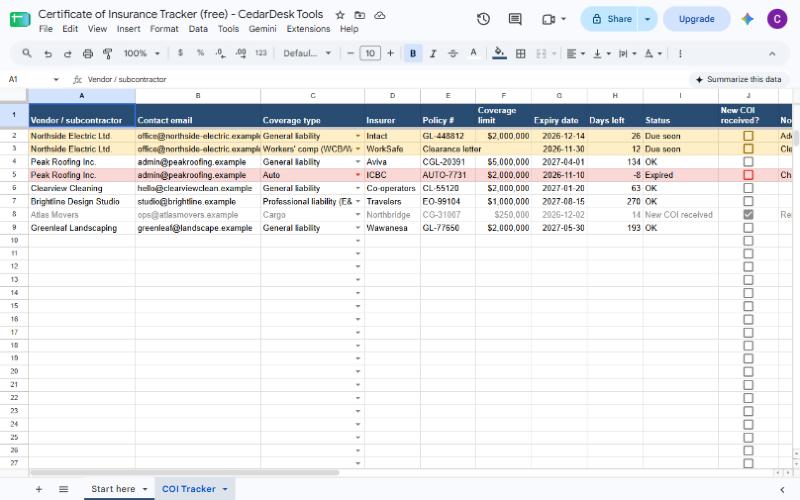
Watch: set it up in 2 minutes

What's in the template
| Column | What it's for |
|---|---|
| Vendor / subcontractor, Contact email | Who you hired and who to ask for an updated certificate. |
| Coverage type | General liability, auto, workers' comp (WCB / WSIB clearance), professional liability (E&O), umbrella, cargo. One row per policy. |
| Insurer, Policy #, Coverage limit | What the certificate says, so you can check limits meet your contract. |
| Expiry date, Days left, Status | Counts down and shows OK, Due soon (30 days, amber), Expired (red) or New COI received (grey). |
| New COI received? | Tick it when the updated certificate arrives, then enter the new expiry date. |
How to use it
- Click Get the free COI Tracker. Google makes a private copy in your Drive.
- Add one row per policy. A roofer with liability, auto and a WCB clearance letter is three rows.
- Check the sheet weekly, or let the add-on below email you and your vendors.
Ask vendors for updated certificates automatically
Chasing certificates is the tedious part. The free Email Reminders - Due Date Alerts add-on can email each vendor before their policy expires, and keep going after it lapses until a new certificate arrives.
- Install Email Reminders (free), then Extensions → Email Reminders → Open reminders → + Add.
- Start from Insurance / permit expiry. Set Date to Expiry date, Send to to Email in each row → Contact email, Skip if done to New COI received? and Name each row using to Coverage type and Repeat to Once (exact date).
- Tick when to send, for example 30 and 7 days before, on the day and 7 days after.
- Write a polite message, e.g. "Hi, our records show your {{label}} certificate expires on {{due_date}} ({{due_in}}). Please send an updated certificate of insurance."
- Save and Turn on.
Every email is logged on a CedarDesk Log tab, a handy record if a claim ever happens. Want only one summary for yourself instead? Choose Digest and get a weekly list of everything expiring in the next 30 days.
Install Email Reminders (free)What to check on a certificate of insurance
- Named insured matches the company you hired.
- Coverage types and limits meet what your contract requires.
- Policy dates cover the whole job, not just the start.
- Additional insured: if your contract requires it, your business should be listed.
- Workers' compensation: in Canada this is usually a provincial clearance letter (e.g. WorkSafeBC, WSIB) rather than a COI.
This is general information, not insurance or legal advice. Check your contract and ask your broker what you need.
Tracking other dates too, like licences and staff certifications? Use the free expiry tracker.
FAQ
What is a certificate of insurance (COI)?
A one-page summary from an insurer or broker that shows a business's policies, limits and policy dates. You ask vendors for one as proof they're insured.
How often should I collect certificates?
At the start of each job and every time a policy renews. Most policies are yearly, so expect a new certificate at least once a year per vendor.
Is this template free?
Yes. Copy it and use it. The Email Reminders add-on is also free for up to 5 reminders per spreadsheet.
Can it email each vendor automatically?
Yes. With the Email Reminders add-on, choose Send to: Email in each row and pick the Contact email column. Each vendor only gets reminders about their own policies.