Domain and SSL certificate expiry tracker (free Google Sheets template)
An expired domain or SSL certificate can take a website or email offline overnight. This free Google Sheets template lists every domain and certificate, counts down the days, and can email you before each one expires.
Get the free templateAdd email reminders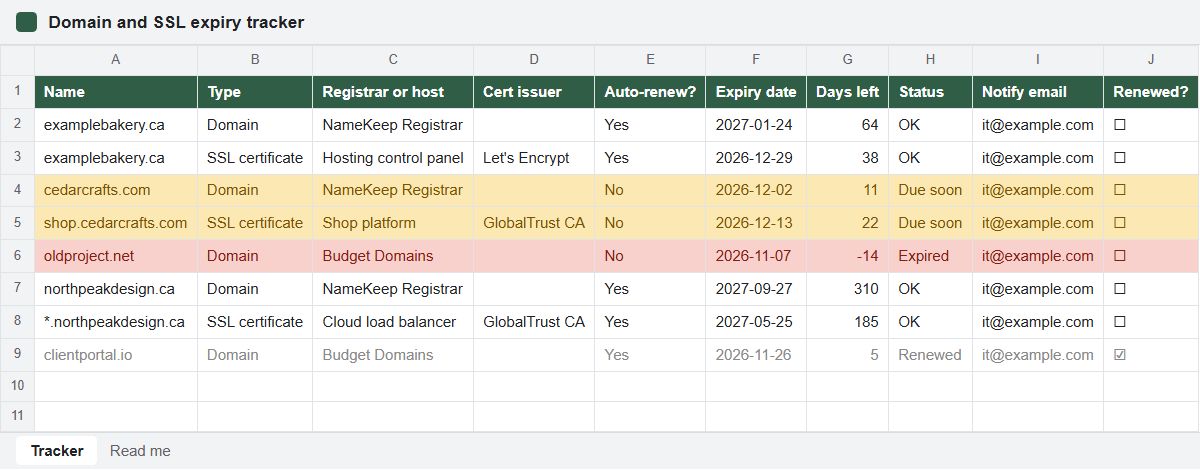
Watch: set it up in 2 minutes

Fields for domains and certificates
An expired domain or certificate takes a site or email offline the moment it lapses. This tracker lists every domain and certificate with who it is registered through, who issued it and whether auto-renew is on, so you have one place to check before anything fails.
| Column | What it does |
|---|---|
| Name | The domain name or the host the certificate covers. Wildcards go here too. |
| Type | Dropdown: Domain or SSL certificate. Domains and certificates get separate rows. |
| Registrar or host | Where you log in to renew it. |
| Cert issuer | The certificate authority, blank for domains. |
| Auto-renew? | What the provider is set to do. Treat Yes as unverified until you have checked it. |
| Expiry date | The date from the registrar dashboard or the certificate details. |
| Days left | Counts down automatically. Negative once the date has passed. |
| Status | OK, Due soon (amber, 30 days or less), Expired (red) or Renewed (grey). |
| Notify email | A shared IT or ops inbox works best. |
| Renewed? | Tick it once the renewal is done. The row turns grey and reminders stop. |
Eight sample domains and certificates
| Name | Type | Cert issuer | Auto-renew? | Expiry date | Days left | Status |
|---|---|---|---|---|---|---|
| examplebakery.ca | Domain | Yes | 2027-01-24 | 64 | OK | |
| examplebakery.ca | SSL certificate | Let's Encrypt | Yes | 2026-12-29 | 38 | OK |
| cedarcrafts.com | Domain | No | 2026-12-02 | 11 | Due soon | |
| shop.cedarcrafts.com | SSL certificate | GlobalTrust CA | No | 2026-12-13 | 22 | Due soon |
| oldproject.net | Domain | No | 2026-11-07 | -14 | Expired | |
| northpeakdesign.ca | Domain | Yes | 2027-09-27 | 310 | OK | |
| *.northpeakdesign.ca | SSL certificate | GlobalTrust CA | Yes | 2027-05-25 | 185 | OK |
| clientportal.io | Domain | Yes | 2026-11-26 | 5 | Renewed |
oldproject.net lapsed 14 days ago and is red. cedarcrafts.com and its shop certificate both have auto-renew off and are amber, which is the dangerous combination. clientportal.io was just renewed, so it is grey.
SSL and domain auto-renew pitfalls
Auto-renew reduces risk, but it fails quietly. Three of the most common ways it breaks are worth tracking.
- The payment card has expired. The domain is set to auto-renew, but the charge declines and the first you hear is an email you did not read.
- The certificate cannot revalidate. DNS records changed, a validation file was removed, or a wildcard certificate needs DNS validation that automation no longer reaches.
- The account owner left. Reminders and invoices go to a mailbox nobody checks.
The habit that helps: treat Auto-renew? = Yes as a claim to verify. Once a quarter, check each provider's dashboard and confirm the expiry date matches your sheet.
Domains also have a grace period after expiry in many cases, but you should not plan around it. Prices and recovery rules vary by registry, and a domain can be unreachable during that time.
Get warned before a domain or certificate lapses
The free Email Reminders - Due Date Alerts add-on checks your sheet every day and emails you before the date, even with the sheet closed.
- Install Email Reminders (free), then Extensions → Email Reminders → Open reminders.
- Click + Add and start from Renewal coming up. Pick the Expiry date column, and the Renewed? column as the done checkbox.
- Tick when to send, for example 60, 30, 14 and 7 days before expiry. Change it to whatever suits you.
- Click Save, then Turn on the daily schedule.
Send it to a shared address so an employee leaving does not mean missed renewals. The add-on runs every day on Google's servers, never sends the same reminder twice, stops when the done box is ticked, and logs every email on a CedarDesk Log tab. It is free for up to 5 reminders per spreadsheet.
Install Email Reminders (free)What to put in this sheet
- Domains: every registration, including old projects you are not using.
- SSL certificates: each hostname and wildcard, with the issuer.
- Related items: hosting plans, CDN contracts and email services, in the Type column or on their own rows.
- Tracking SaaS plans too? See the subscription renewal tracker.
Domain and SSL questions
Is auto-renew enough to keep a domain safe?
It helps, but it can fail if the card expires or the account email is unmonitored. Keep a reminder as a second check and confirm the date in the dashboard.
Where do I find a certificate's expiry date?
In most browsers, click the padlock next to the address and open the certificate details. Your host or certificate provider's dashboard shows it as well.
Where do I find a domain's expiry date?
Your registrar's dashboard lists it. A public WHOIS lookup can also show it for many domains.
Does the sheet check domains and certificates automatically?
No. You enter the dates and the sheet counts down. It never contacts your registrar or website, so nothing about your accounts is shared.